
Enter a text String to generate an SEO Friendly URL.
How to make an SEO friendly URLs
This tool helps you convert any plain text into a URL-friendly slug by turning all letters into lowercase and replacing spaces with hyphens.
Step-by-Step Instructions:
1. Enter Your Text
- Click on the input box labelled “Enter Text”.
- Type your desired title or phrase (e.g., My Blog Post Title).
- You can only use letters, numbers, and spaces.
- Special characters like !, @, #, or & are not allowed.
2. Click the Convert Button
- Press the green “Convert” button.
- Your text will be processed, and the result will be displayed below.
Example
Input: My Blog Post Title Output: my-blog-post-title
3. Copy the Slug
- Click the “Copy to Clipboard” button.
- A confirmation prompt will appear-click OK to confirm.
- The slug is now ready to paste into your CMS, blog post, SEO tool, or anywhere else!

What are SEO Friendly URLs?
SEO friendly URLs are web addresses that are easy to read, descriptive, and optimised for search engines. They help both users and search engine crawlers understand the content of a web page just by looking at the URL. A good SEO URL is short, includes relevant keywords, uses hyphens to separate words, and avoids special characters or unnecessary parameters.
For example, a URL like www.example.com/seo-tips is more effective than www.example.com/page?id=1234. The cleaner structure improves user experience and can increase click-through rates from search results.
SEO friendly URLs contribute to better rankings because they provide clear context about the page’s content. They also make it easier for users to share and remember links. When building a website or blog, using SEO URLs is a simple yet powerful step toward better visibility online.
Why are URLs important for SEO?
Both a website user and the search engines can use a URL to understand the content of a web page.
It is important that a URL is clear and easy to understand, as often we share web pages on social media that contains the link.
Making that link easy to read can help with more click-throughs to your website pages.
Note: It is also important to optimise your page title and meta description as well.
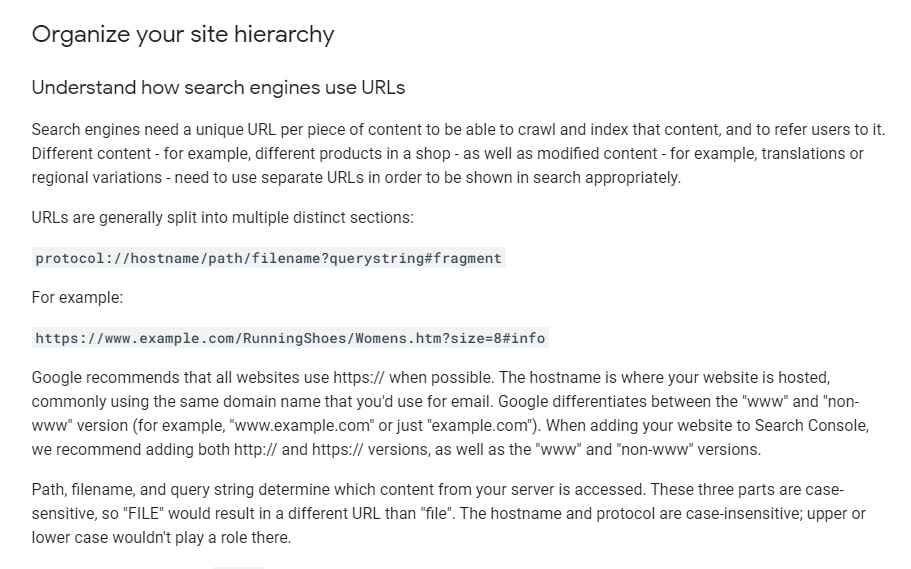
Google provides some useful information about URLs in their Google SEO starter guide.
What are the SEO friendly URL best practices?
In most cases, it is advisable to incorporate keyword phrases into your URLs.
Each page on your website can be used to target a specific set of keywords.
Here is an example of a non-friendly URL: https://dcpweb.co.uk/service1
Here is an example of an SEO friendly URL: https://dcpweb.co.uk/website-design
In the above URL, my target keyword is “Website Design“.
- The keywords are separated with a hyphen.
This is the page title for the above website design URL: Website Design | Web Design Company | Best Website Design | DCP
- The first keyword phrase listed is also used in the URL.
Here is the meta description for the page: DCP Web Design Company | Get a free website design quote! – DCP Web Designers, best website design solutions – 0203 539 4415 | 07838 678 770 – Learn from our 15 years of web design knowledge and experience.
- The keyword is also incorporated into the page meta description.
Ultimately our goal is to be consistent with the keywords we are using on our website page content, page title, image alt tags and meta descriptions.
Using hyphens in a URL is considered to be best practice and even stated by Google in their “keep a simple URL structure” documentation.
Should I use lowercase characters in URLs?
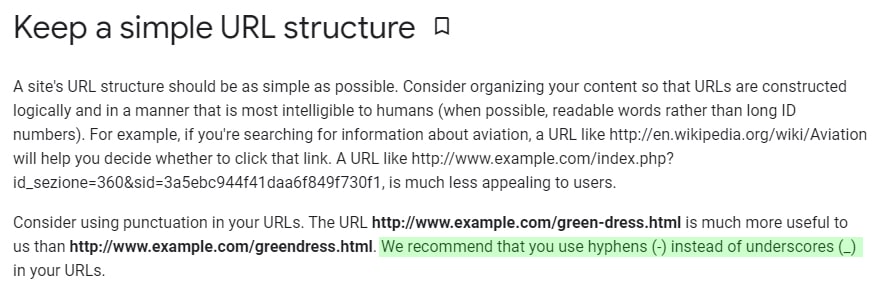
It is possible for URLs to contain both uppercase and lowercase characters.
I would always recommend where possible to use only lowercase characters in your URLs.
Some web servers will treat uppercase and lowercase URLs as different and may result in a 404 error.
Also, lowercase URLs are much easier to type into a web browser making them user-friendly.
This is one of the main reasons we use hyphens in URLs for word separation.
If you are using WordPress, then you can select the “Post name” option which is located in the WordPress admin control panel.
- Login into WordPress admin.
- To go “Settings” / “Permalinks”.
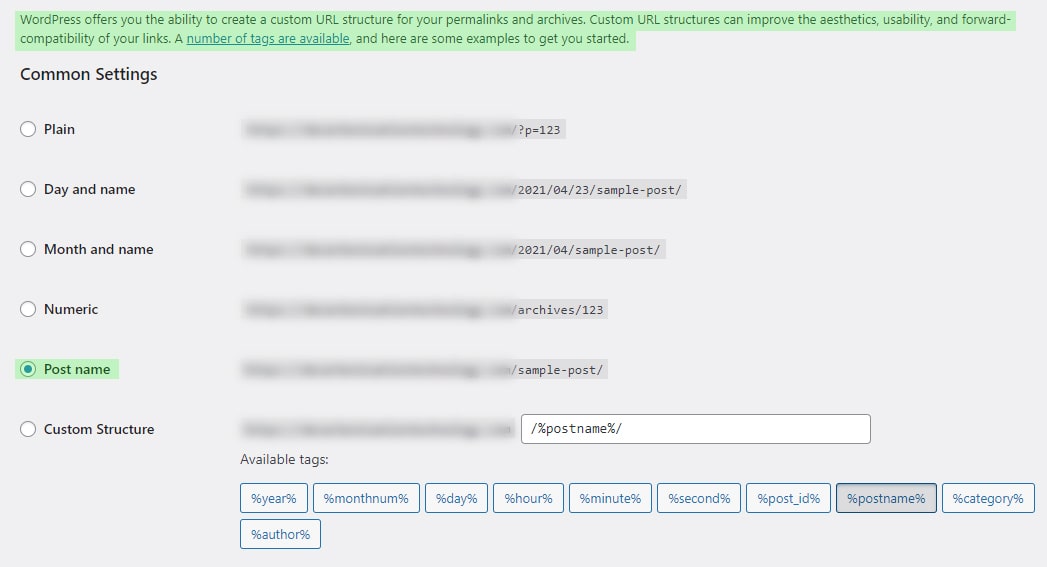
Note: If you plan to change your URL structure on WordPress or any other website, then I would advise you to contact your web designers first and set up an action plan for 301 URL re-directs.
Which is the best HTTP or HTTPS URLs?
It has been common practice to use HTTPS URLs for some time.
HTTPS URLs are used for better security and can be created as default when you install an SSL Certificate.
Let’s Encrypt offer free SSL certificates so there is no reason not to have SSL encrypted URLs running on your website.
Cpanel users can auto-install Let’s Encrypt certificates for FREE and most hosting providers will offer a free SSL when signing up to a hosting solution with a domain name.
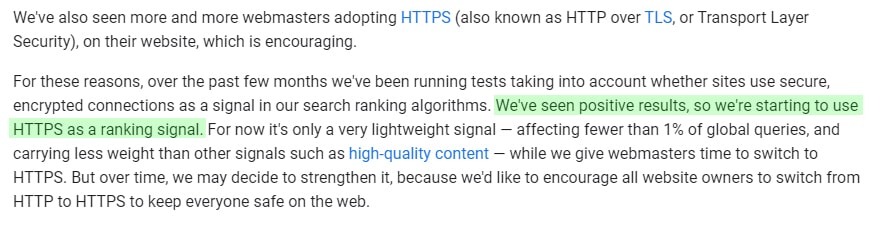
Google also states that “we’re starting to use HTTPS as a ranking signal“.
Should I use Sub Folder or Subdomain?
Google and other search engine treat a subdomain as a separate website. For this reason, I would recommend using a subfolder structure that is more SEO friendly.
For example, my blog is located on the following URL: https://dcpweb.co.uk/blog
A subdomain would use a URL like this: https://blog.dcpweb.co.uk
As mentioned above the subdomain would be seen as a separate website by Google. It will have its own backlink profile and search ranking results.
It is better to have all the power of your content on the same domain, so using a subfolder structure will help you to achieve this.
Subfolder URLs also have a better structure.
Example blog post from my website: https://dcpweb.co.uk/blog/30-essential-tips-for-improving-your-web-design
The blog post URL above contains 3 key elements:
- Domain Name: https://dcpweb.co.uk/
- Subfolder: blog/
- Blog post URL: 30-essential-tips-for-improving-your-web-design
Here is the Google search engine result for the above blog post:
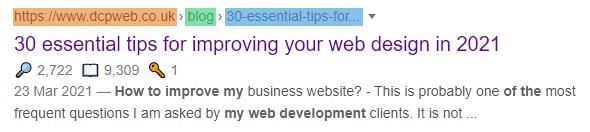
As you can see in the above image, Google has auto-generated a breadcrumb trail based on the URL structure.
FAQs about SEO Friendly URLs
An SEO friendly URL is a web address that is clean, descriptive, and easy for both users and search engines to understand.
They improve search engine rankings, user experience, and click-through rates by clearly indicating the page content.
It should include relevant keywords, use hyphens to separate words, and avoid unnecessary numbers or special characters.
Yes. Search engines recommend using hyphens (-) instead of underscores (_) to separate words.
Yes, it’s usually best to keep URLs concise and remove unnecessary stop words.
Yes, but always set up proper 301 redirects to avoid broken links and losing SEO value.
Dynamic URLs with parameters (e.g., ?id=123) can be less effective. Clean, static URLs are preferred.
Yes. Shorter URLs tend to perform better in search results and are easier to share and remember.
Yes. URLs are case-sensitive, so it’s best to use all lowercase letters to avoid confusion.
Only if necessary. Including dates can make content look outdated over time and may reduce click-through rates.
Yes, this tool is completely free to use. There are no subscriptions, no hidden fees, and no account required. You can generate SEO-friendly slugs, copy them to your clipboard, and use them for your website, blog, or digital projects-all at no cost.
Disclaimer: DCP Web Designers are not liable for damage or loss of profits caused by using the Online Slug Generator Tool on this page.