Use this tool to quickly check HTML Title, Meta Keywords and Description lengths for SEO.
How to use the HTML Title & Meta Description Length Checker
This tool is designed to help you check the length of your HTML Title, HTML Keywords, and HTML Meta Description, as well as provide recommendations for optimum lengths based on current SEO best practices. Here’s how to use it:
Enter Your Content:
HTML Title: Type or paste your HTML title into the first text box. Note that it accepts up to 200 characters.
HTML Keywords: In the text area below, enter your HTML keywords. This field supports up to 500 characters.
HTML Meta Description: Enter your meta description into the third text box. You can use up to 1000 characters.
Submit Your Inputs:
Click the “Check” button.
View the Results:
After submission, the tool calculates and displays:
The number of characters and words for each field.
Recommended optimum lengths for each field:
HTML Title: 50-60 characters.
HTML Keywords: 5-10 concise keywords (around 50-70 characters total).
HTML Meta Description: 150-160 characters.
The results are shown in a designated output area below the form.
Copy the Output (Optional):
If you want to copy the output to your clipboard, click the “Copy Output” button.
A confirmation prompt will appear for security. Confirm the prompt, and the output will be copied to your clipboard.
This tool is perfect for quickly verifying your content lengths and ensuring your SEO elements are optimised according to best practices.
Understanding Meta Tags
Meta tags are snippets of text that describe a page’s content; they don’t appear on the page itself, but in the page’s source code. They are critical for SEO as they help search engines understand what your page is about. The three main meta tags we’ll focus on are:
Meta Title: Often displayed as the clickable headline in SERPs.
Meta Keywords: Although less influential today, they were once used by search engines to understand page content.
Meta Description: A brief summary that appears below the meta title in search results.
While search engines have evolved, optimising these tags can still impact user engagement and the overall relevance of your page.
Optimising the Meta Title
The meta title is one of the first elements users see on a SERP, making it crucial for attracting clicks. Here are several key points to consider when optimising your meta title:
Keep It Concise and Descriptive:
A well-crafted meta title should accurately represent the content of your page. Experts generally recommend keeping your title between 50 and 60 characters. This length ensures that your title won’t be cut off in search results, maintaining clarity and impact.Include Primary Keywords:
Incorporating your target keywords at the beginning of your meta title can signal to both search engines and users that your page is relevant to their query. However, avoid keyword stuffing. Instead, blend the keywords naturally into a title that reads well.Reflect Your Brand:
If applicable, consider including your brand name at the end of the title. This can boost recognition and trust, especially if your brand has a strong reputation. For example, “SEO Best Practices | YourBrandName” can work well.Create a Compelling Call-to-Action:
A meta title can also serve as a mini advertisement. Using action words or numbers can intrigue users. For example, “5 Tips for Perfecting Your Meta Tags” might encourage users to click through.
Optimising Meta Keywords
Although many search engines like Google have diminished the importance of the meta keywords tag, it is still used by some smaller search engines and can have a minor impact on overall SEO. Here’s how to approach meta keywords:
Use Relevant, Specific Keywords:
Instead of listing every conceivable keyword, focus on a concise list of 5–10 keywords that are directly relevant to your page content. This specificity helps avoid confusion and demonstrates a clear focus.Avoid Keyword Stuffing:
Overloading the meta keywords tag with too many keywords can be perceived as spammy. Stick to a brief list of terms that accurately reflect the content of your page. Quality always trumps quantity.Maintain Consistency Across Your Site:
If you’re managing a multipage website, ensure that each page’s meta keywords are tailored to its content. This consistency reinforces the relevancy of your pages according to search engines.
Optimising the Meta Description
The meta description is like a pitch to your potential visitor. It must succinctly summarise the page content while enticing the user to click. Here are strategies for optimising your meta description:
Aim for the Ideal Length:
While meta descriptions don’t directly affect rankings, they do impact click-through rates. An ideal meta description typically falls between 150 and 160 characters. Staying within this range ensures your description isn’t truncated in SERPs.Incorporate a Call-to-Action:
A clear and compelling call-to-action can encourage users to visit your site. Phrases such as “Learn more,” “Discover,” or “Get started” can be effective in prompting user action.Highlight Unique Selling Points:
Your meta description should clearly communicate what sets your content apart. Whether it’s unique insights, expert advice, or a comprehensive guide, make sure the value proposition is clear.Match User Intent:
The meta description should align with what your target audience is searching for. Consider the user’s intent, whether informational, transactional, or navigational, and tailor your description accordingly.
Best Practices and Common Pitfalls
Adhering to best practices when optimising meta tags is essential for long-term success. Here are some key tips and common mistakes to avoid:
Keep It Relevant:
All meta tags should accurately reflect the content on the page. Misleading tags may boost click-through rates initially, but they will ultimately harm your site’s credibility and increase bounce rates.Avoid Duplication:
Duplicate meta tags across different pages can confuse search engines. Each page should have unique meta tags that clearly define its individual purpose.Monitor Performance:
Regularly review your meta tags using SEO tools. A/B testing different meta titles and descriptions can provide insights into what resonates with your audience and improves click-through rates.Stay Updated on SEO Trends:
SEO best practices evolve over time. Keeping up-to-date with the latest trends and algorithm updates will ensure that your meta tag strategies remain effective.
The Role of Meta Tags in Overall SEO Strategy
Meta tags are one piece of the broader SEO puzzle. While they are crucial for on-page optimisation, they work best when integrated with other SEO practices such as quality content creation, user experience optimisation, and backlink building. Here’s how meta tags fit into the bigger picture:
Improving Visibility:
Well-optimised meta tags enhance your page’s appearance on search engine results, which can increase organic traffic. A compelling meta title and description work together to capture the attention of potential visitors.Enhancing Relevance:
By ensuring that your meta tags accurately represent your content, you help search engines better understand your pages. This relevance can contribute to improved rankings for targeted queries.Boosting User Engagement:
A thoughtful meta description can act as a promise of what the user will find on your page. When users see a relevant and inviting snippet, they’re more likely to click through and engage with your content.
FAQs about HTML Title & Meta Description Length Checker
A title tag is an HTML element that defines the title of a web page. Placed within the section of your HTML, it appears as the clickable headline in search engine results and is also displayed in the browser’s title bar or tab. A well-crafted title tag should be concise, usually between 50 to 60 characters, and include relevant keywords. This not only informs users about the content of the page but also plays a critical role in SEO, helping search engines understand and rank your page appropriately.
<head><title>Example Title</title></head>
It is important to format your title tag correctly, so your keywords are prominent.
At DCP we place our Primary Keyword First, then the Secondary Keyword and finally, our Brand Name.
Title tag formatting example
Web Designers | Web Design London | DCP
- Red = Primary Keyword
- Blue = Secondary Keyword
- Green = Brand Name
The optimal title length for SEO is typically between 50 and 60 characters. This range ensures that your title tag displays properly in search engine results without being cut off (truncated). Google usually shows up to 600 pixels of the title tag, which roughly translates to 50–60 characters, depending on the width of each character used. Keeping your title within this limit helps maintain readability, improves click-through rates, and ensures that the most important information is visible to users.
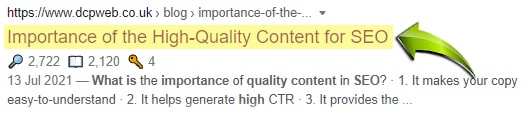
Web page title tags help search engines and internet users to understand what your pages are about. Most of us use search engines to find products or services, and we often use the title of a web page in the search engine results to determine the web page content. It should be noted that the title tag is also used in the web browser tab, webpage bookmarks and social media posts.
Below, I have listed some examples of how title tags are used:
1. Search engine results page (SERPs)
In the image below you can see an example of a search result in Google for a blog post I created here: 30 essential tips for improving your web design
I have highlighted in yellow the web page title tag that is used in the search result.
It should be noted that the search result below is a rich snippet that contains more information than a standard search result.

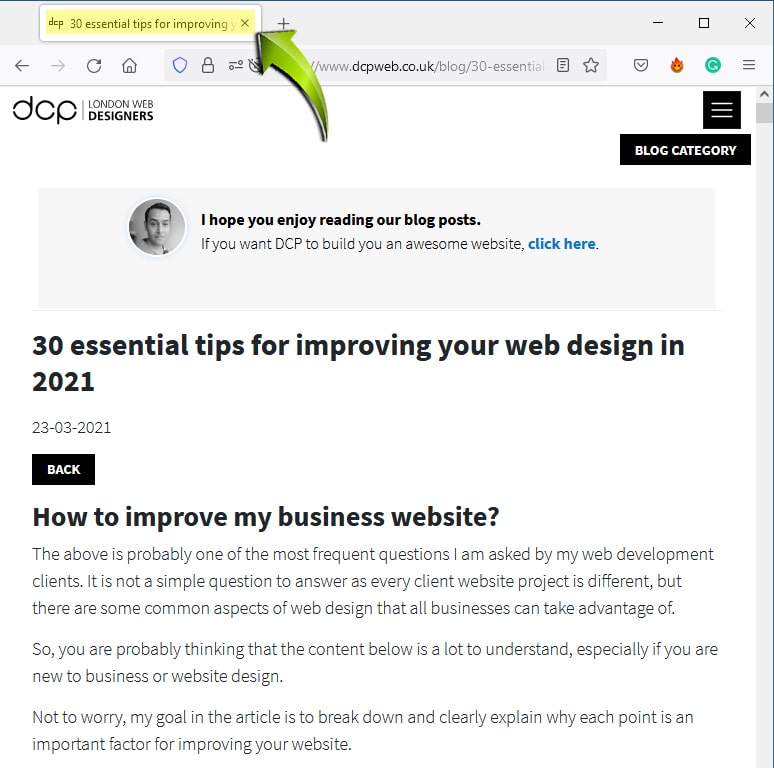
2. Web browser tab
All modern web browsers allow you to create tabs to open new web pages.
In the image example below, I am using Google Chrome.
The tab contains some, but not all the title tag.
3. Facebook posts
In the Facebook post below you can see I have highlighted the title tag in yellow. It should be noted that Facebook uses Open Graph tags to auto-generate content. Here is an example of the OG (Open Graph) tags used on my blog post:
<meta property="og:type" content="website" /> <meta property="og:site_name" content="DCP Web Designers" /> <meta property="og:locale" content="en_GB" /> <meta property="og:url" content="https://dcpweb.co.uk/blog/30-essential-tips-for-improving-your-web-design"> <meta property="og:title" content="30 essential tips for improving your web design in 2021" /> <meta property="og:description" content="How to improve my business website? - This is probably one of the most frequent questions I am asked by my web development clients. It is not a simple question to answer as every client website project is different, but there are some common aspects of web design which all business can take advantage of. Take a look at these 30 Tips for improving your web design." /> <meta property="og:type" content="website"/> <meta property="og:image" content="https://cdn.dcpweb.co.uk/userfiles/blog_page/image/30 essential tips for improving your website design in 2021.jpg" /> <meta property="og:image:alt" content="30 essential tips for improving your web design in 2021" />
Read more about Open Graph Facebook Tags.

4. LinkedIn posts
If you have already implemented the Open Graph for Facebook, then you are in luck!
LinkedIn also uses the Open Graph tags to pre-populate post content, as shown in the image below.
In most cases, LinkedIn will automatically display the blog post thumbnail, Page Title (Highlighted in Yellow) and the website domain.

5. Twitter (x) Posts
Twitter is one of the most popular social media platforms.
Twitter also uses tags to markup content for Tweets.
Twitter card tags look similar to Open Graph tags, and are based on the same structure as the Open Graph protocol.
When you implement Twitter card tags, the following content is auto-populated in a Tweet:
- Page title
- Thumbnail
- Description
- Website domain
Here is an example of the Twitter card tags used in my blog post:
<meta name="twitter:card" content="summary_large_image"> <meta name="twitter:title" content="30 essential tips for improving your web design in 2021" /> <meta name="twitter:description" content="How to improve my business website? - This is probably one of the most frequent questions I am asked by my web development clients. It is not a simple question to answer as every client website project is different, but there are some common aspects of web design that all business can take advantage of. Take a look at these 30 Tips for improving your web design."> <meta name="twitter:image:src" content="https://cdn.dcpweb.co.uk/userfiles/blog_page/image/30 essential tips for improving your website design in 2021.jpg" />
Read more about Twitter Card Tags.

As you can see from the above examples, it is important that the page title is accurate as it is displayed across all major social media platforms and in Google and other search engines.
Both Twitter and Facebook have their own meta tags that allow you to change the page title when sharing on these social media platforms. In general, it is advisable to keep your page titles consistent across all social media platforms, but you can change them if your page title is too long for social media posts.
The meta description is an HTML tag that provides a brief summary of the website page’s content. Search engines like Google or Yahoo often display the meta description in search results. It is worth putting in the effort to optimise your meta descriptions to improve click-through rates.
<meta name=”description” content=”A short description of the content on your website page would go here.”></head>
In most cases, the length of your meta description should be a maximum of 160 characters in length. On many websites, I see that they state the meta description should be no more than 160 characters, but this is not true.
The meta description can be of any length, but most search engines will only display the first 160 characters on the search result page.
Example meta description displayed in Google search results
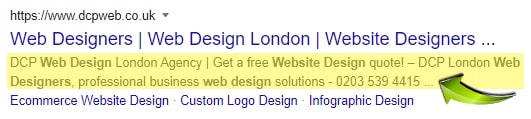
The best meta descriptions have an engaging opening sentence that draws people into clicking on them.
They describe what’s inside the page without being overly promotional or salesy.
The goal of your meta description tag is to provide enough detail so users know exactly what the page you linked to is about before deciding if they want to visit it.
If done right, this can lead to more clicks when visitors see these links in organic results.
Meta Keywords are used to add content to your website page that help search engines understand what your page is about. Meta keywords are displayed in the code of your website and are not visible to your website visitors.
<meta name=”keywords” content=”How to improve my business website, Tips for improving your web design, Website Design Tips” />
All keyword phrases listed in your meta keyword tag are separated by commas. In the above example, you can see three keyword phrases.
The meta keywords can be of any length, but in most cases, you should only add 4 to 5 keyword phrases with a total character count of 160.
It would be noted that search engines no longer you meta keywords to understand the content of a website page, many years ago Google would use meta keywords to understand the content of a page, but this also allowed website developers to trick the search engines into ranking pages which had poor quality content.
I would still recommend adding meta keywords to your website pages, as these can still be useful for other web services like business directories.
It is important at a minimum to add the following tags/markup to your website pages:
- Meta Title
- Meta Description
- OG Tags (Facebook)
- Twitter Card Tags
I would also recommend adding Schema Markup to your website pages which can help rank your website pages higher in Google search results.
Schema markup is code (semantic vocabulary) that you can add to your website pages that help search engines return more informative results to users.
For example, if you did a Google search for: 30 essential tips for improving your web design in 2021
You will see the following Rich Snippet Result:
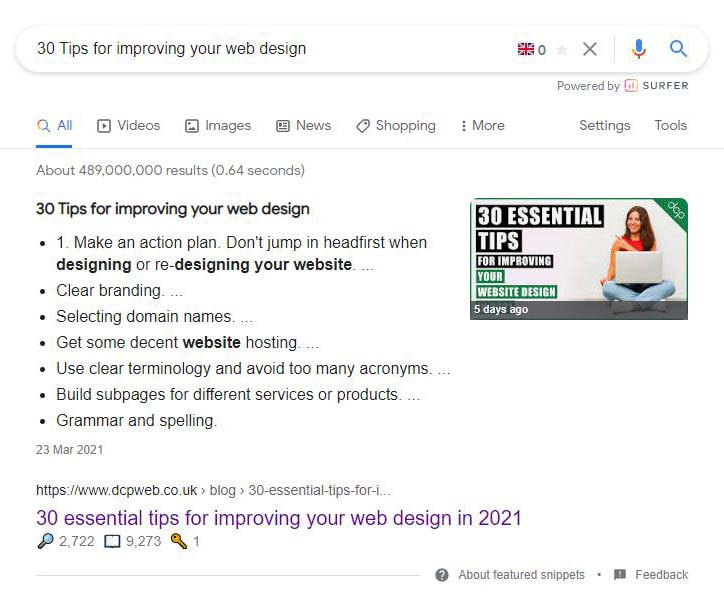
As you can see in the above image a Rich Snippet contains more content than a normal Google search listing:
- Sub Title
- Bullet List
- Image
- Page URL
- Page TItle
Rich Snippets will show different content depending on the schema markup used.
Here are a few examples of Schema Markups:
- Local Business
- Article
- Book
- Breadcrumb
- Course
- Critic review
- Dataset
- Event
You can view more examples of schema markup types here: Improve your website SEO using Schema Markup
It is worth spending the time to learn about schema markup as it has been adopted by all major search engines.
Ultimately schema markup will help Google and other search engines understand more about the content of your website pages.
You can learn more about Schema Markup by visiting my detailed article: How to improve your website SEO using Schema Markup – Beginners Guide to Structured Data 2021
The default installation of WordPress does not have the best tools for managing Meta Titles and Meta Descriptions. There are many great free tools to help you optimise your website for search engines like Google and Bing:
Yes, this tool is completely free to use. You can input your HTML Title, Keywords, and Meta Description, and the tool will instantly provide you with:
Character and word counts for each input
SEO best practice suggestions for optimal lengths
A simple “Copy Output” button with confirmation for clipboard use
There are no logins, subscriptions, or payments required-just a helpful tool to optimise your meta tags for better SEO.
Disclaimer: DCP Web Designers are not liable for damage or loss of profits caused by using the HTML Title & Meta Description Length Checker on this page.