

Schema markup is a specific type of code added to your website pages that helps search engines, like Google, better understand the content on your site. By using schema markup, you provide additional context and structure to your content, allowing search engines to accurately interpret and display it on search engine results pages (SERPs). This leads to the possibility of rich snippets, which can include extra details such as ratings, reviews, images, or product availability, making your listing stand out from others in the search results.
Implementing schema markup offers a number of benefits for SEO. It improves your site’s chances of appearing in rich results, enhances the overall user experience, and can lead to higher click-through rates (CTR) since rich snippets are more visually appealing and informative. Additionally, schema markup helps search engines categorize and prioritize your content, which can improve your rankings and overall visibility.
In this article, I will demonstrate how using schema markup (structured data) can significantly enhance your website’s SEO. We’ll explore various types of schema markup, their impact on search engine performance, and why incorporating structured data into your SEO strategy can lead to long-term benefits in terms of traffic and search engine rankings.

Table of Content
- What are rich search results?
- What is schema markup?
- Why is schema important?
- How to use schema markup on your website
- Go to the Google Structured Data Markup Helper website
- Select a data type
- Paste in the website page URL you want to markup
- A new page will load the Google structured markup tool
- Select content on your page to add to mark-up fields
- Create HTML
- Structured data as JSON-LD markup
- Testing Structured data as JSON-LD Markup
- Testing structured data results
- Improving structured data with additional tags
- Fixing errors and warnings
- Adding structured data to your website
- Monitoring your structured data
- Useful schema markup resources
What are rich search results?
Rich results are experiences that can appear on Google search as carousels, images, video content, company information, FAQs and other content types.
The main goal of rich results is to enhance a search engine user’s experience by displaying more useful information in a search result.
Example: Recipe markup includes data like time to prepare the dish, ingredients, user reviews and recipe images.
When you add Recipe markup to your page, you are telling the search engines:
- The recipe takes 45 minutes to prepare
- This is the list of ingredients required
- Here is a picture of the dish
- here are some user reviews
Example Recipe Rich Results
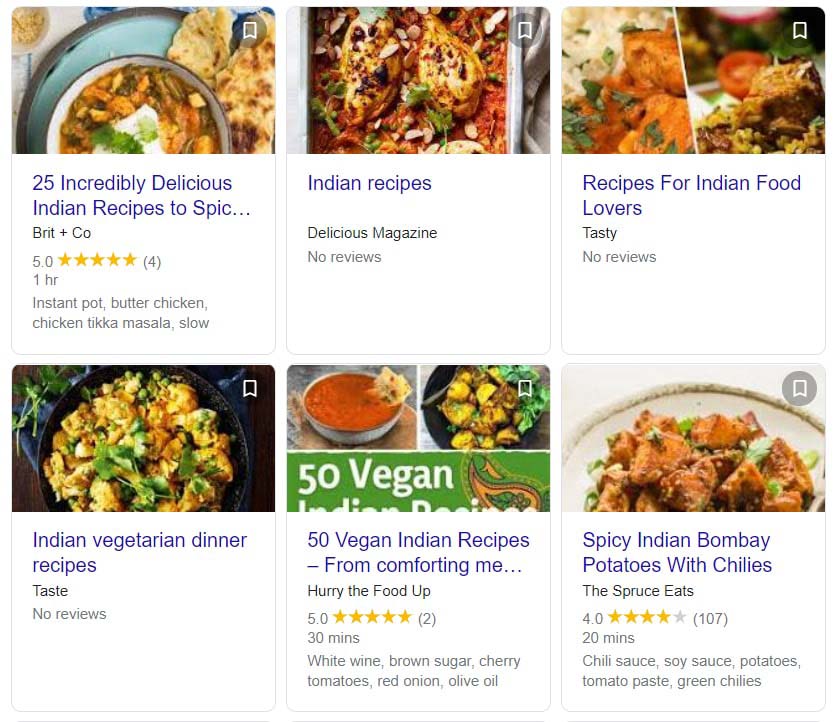
As you can see in the above image, not all the results returned are the same.
The listings that stand out the most have review stars.
The star ratings are part of the schema markup implemented on the website recipe page.
You can view more information about recipe snippet cards here: https://developers.google.com/search/docs/data-types/recipe
Rich search results tend to have a higher click-through rate as they are displayed at the very top of Google search results.
Standard search engine result typically only includes a title, URL, and meta description. A rich snippet in a search result page might include additional useful information as shown in the above example recipe cards, the video snippet example below and the event snippet example below.
You may have searched for a “how to task” in Google search and a rich result is returned. YouTube often returns rich results for relevant video content which helps to answer a user’s search query.
Below you can see an example of a YouTube rich result returned for a video I created on my YouTube channel.
Example YouTube Rich Result
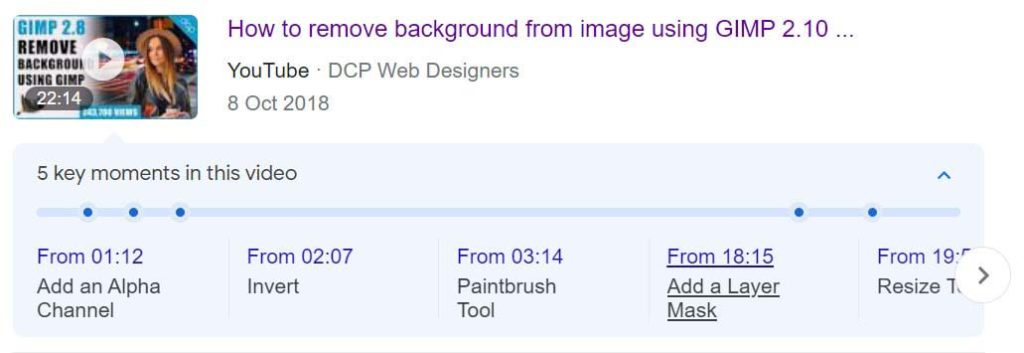
A Google-featured snippet (Rich Result) can greatly improve the visibility of content on your website and also on external sites like YouTube and Facebook.
This is a link to the example video that is shown above which I uploaded to my YouTube channel: https://youtu.be/L5uVTEItvHo
Stats for the example YouTube video
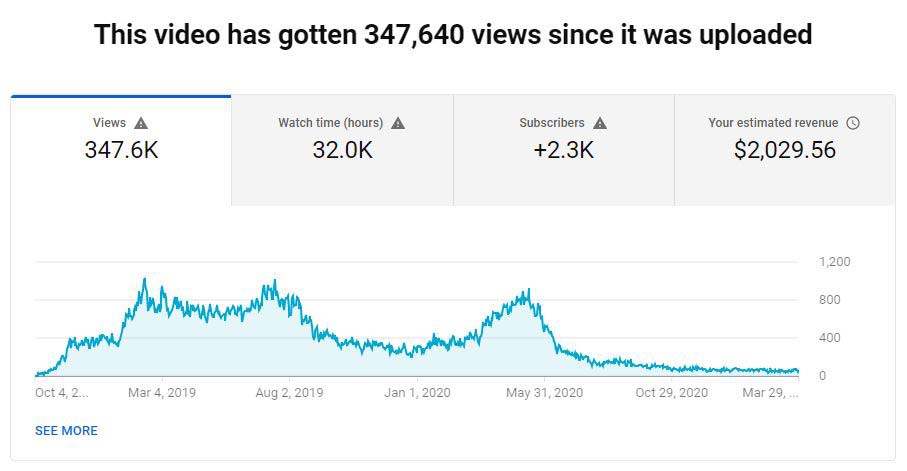
As you can see, having a rich snippet (Rich Result) for your content can greatly improve exposure, click-through ratios and visitor traffic.
Note: you can also add a Video Schema Markup to embed YouTube videos on your blog posts.
This can apply to content on your website and external content shared on other web platforms.
One of the main goals of rich search results is to create a standardised markup (format) to highlight key information about a website page, which then allows a search engine to understand more accurately what that page contains or its purpose.
What is schema markup?
Using structured data (schemas) allows Google and other search engines to target your page content more accurately and serve that page content to fulfil a user’s search query. After all, the main goal of all search engines is to serve a user the most relevant content for a given keyword search phrase to improve user experience.
Rich results are generated from specific code added to your website pages. There are 3 main types of code formats that can be used to add structured data to your website:
Schemas are used to mark up the content of a web page in ways that can be easily understood by major search engines like Microsoft, Google, Yandex and Yahoo.
Schema markup helps machines like Alexa understand what kind of thing a piece of content is about.
You can view more information about Schemas here: https://schema.org/
Structured data (Schema markup) is a standardised markup format for providing key information about a specified page and categorising the page content.
For example, on an event page, the structured data may contain the:
- Event name
- Start date and time
- End date and time
- The address location
- Event images
- Event description
- URL link to the event page
- Ticket price
- Ticket price currency
- Performers attending the event
- Organiser of the event
Example Google search results for festival keyword
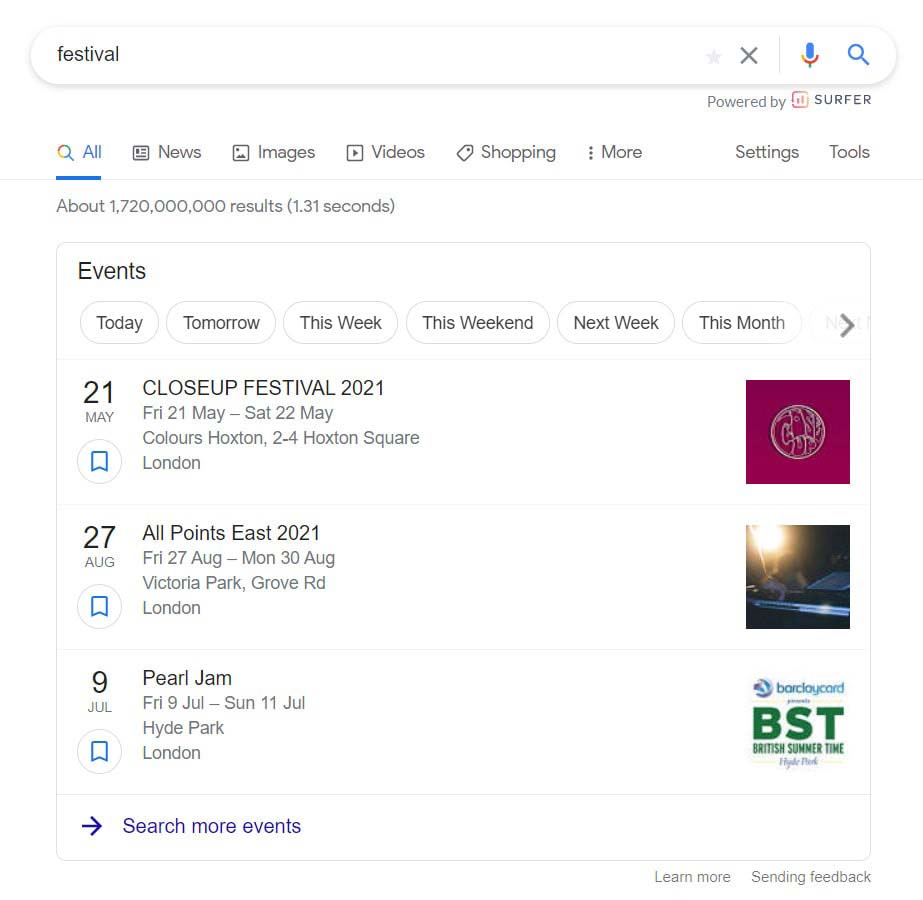
In the above image, you can see the results returned by the Google search engine for the keyword Festival.
Google is displaying search results from different websites, in the above example you can see:
- The festival event name
- The date
- The address
- The location
- An image / Logo
The most important thing to note is that all the listings are consistent.
They all contain the same structured data.
A few important notes:
- Google returned search results based on my location.
- I was logged into my Google account when I did the search so Google already knows my location.
- Google can also use your IP address for the GEO location.
- There are options at the top of the results to view Today, Tomorrow, This Week, This Weekend etc…
- There is an option at the bottom of the results to search for more results.
This is a good example of how structured data (Schema Markup) can help search engines understand the content on a specific page. All pages which implement structured data have to follow a set of rules.
When I click on the first search result I can see more detailed information about the festival event.
Google detailed view of a specific festival
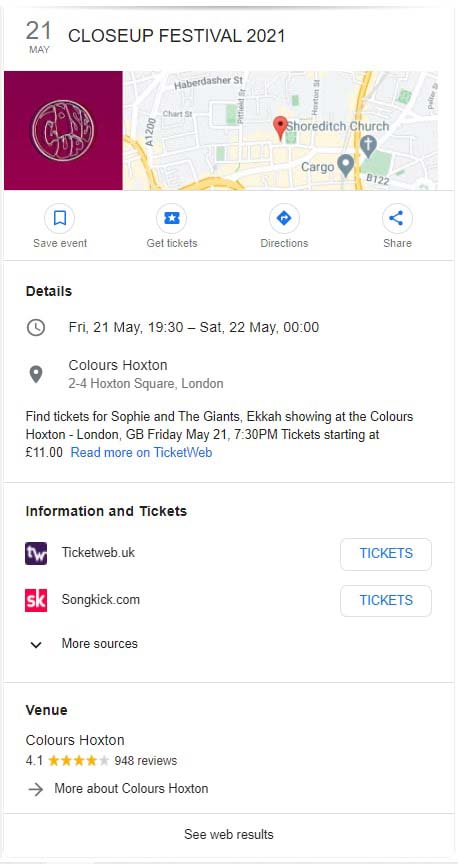
The detailed view as suggested contains specific information about this event. The “key” here is that all the events will contain the same or similarly structured data detailed view.
Rich snippets (RIch Results) are often displayed in Google search results at position zero. A rich result will normally display above all other Google search listings, this also means if you create high-quality content then you can achieve a page 1 Google search result without having to compete with other page 1 search results.
Rich snippets can be displayed on both desktop search results and mobile search results.
Example mobile rich result for a blog post

In the mobile view example above the rich result is for a blog post I created here: 30 essential tips for improving your web design in 2021
- Below you can see an example of the rich result from Google desktop view.
Example desktop rich result for a blog post
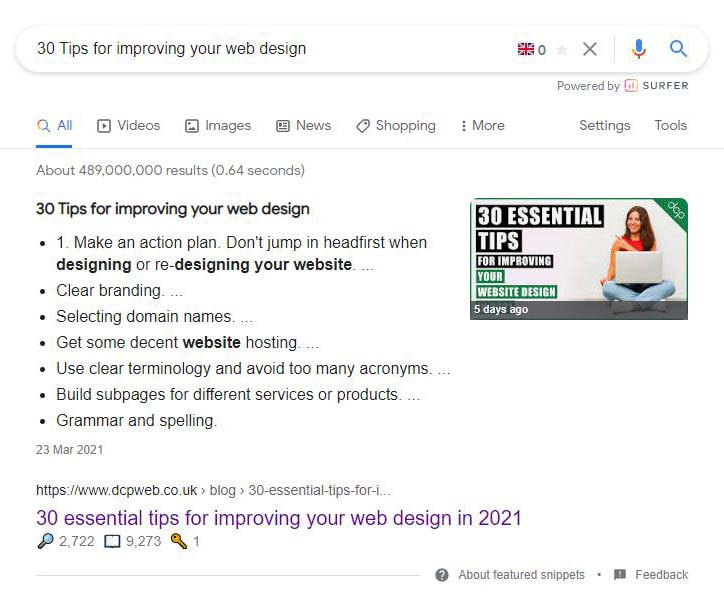
Below you can see the schema markup in JSON-LD format for the above blog post.
					<script type="application/ld+json">
{
  "@context" : "http://schema.org",
  "@type" : "Article",
"mainEntityOfPage": {
        "@type": "WebPage",
        "@id": "https://dcpweb.co.uk/blog"
      },
  "headline" : "30 essential tips for improving your web design in 2021",
  "author" : {
    "@type" : "Person",
    "name" : "Pankaj Shah"
  },
  "datePublished" : "2021-03-23",
  "dateModified" : "2021-03-23",
  "image" : "https://cdn.dcpweb.co.uk/userfiles/ckeditor/blog/essential-tips-for-improving-your-website-design/30-essential-tips-for-improving-your-website-design-in-2021.jpg",
  "articleSection" : "Website Design",
  "articleBody" : "How to improve my business website? - This is probably one of the most frequent questions I am asked by my web development clients. It is not a simple question to answer as every client website project is different, but there are some common aspects of web design which all business can take advantage of.",
  "url" : "https://dcpweb.co.uk/blog/30-essential-tips-for-improving-your-web-design",
  "publisher" : {
    "@type" : "Organization",
    "name" : "DCP Web Designers",
    "url": "https://dcpweb.co.uk/",
"logo": {
          "@type": "ImageObject",
          "url": "https://cdn.dcpweb.co.uk/userfiles/ckeditor/dcp-web-designers-logo/dcp-logo-01.jpg"
        }
  }
}
</script>
Important Note: It is not a requirement to create structured data (schema markup) like above in order for your website content to appear in Google search results as a rich result.
The goal of creating the schema markup is to give Google more specific information about the content on your website page.
If your website pages already have a good structure then Google can generate a rich result without the need of adding schema markup.
The advantage of using schema markup is you can tell Google more specific information about the content on your website page and provide additional metadata like your organisation name, organisation logo, date the articles for created, date the article was modified, a specific image for the article and much more.
There is the potential to improve your search engine rankings if you implement structured data (schema markup) on your website, however, adding markup does not mean that Google or other search engines will show your content as a rich snippet. The most important factor is the actual content on your website pages.
Here is an example explanation from Schema.org
Most webmasters are familiar with HTML tags on their pages. Usually, HTML tags tell the browser how to display the information included in the tag. For example, <h1>Avatar</h1> tells the browser to display the text string “Avatar” in a heading 1 format. However, the HTML tag doesn’t give any information about what that text string means—”Avatar” could refer to the hugely successful 3D movie, or it could refer to a type of profile picture—and this can make it more difficult for search engines to intelligently display relevant content to a user.
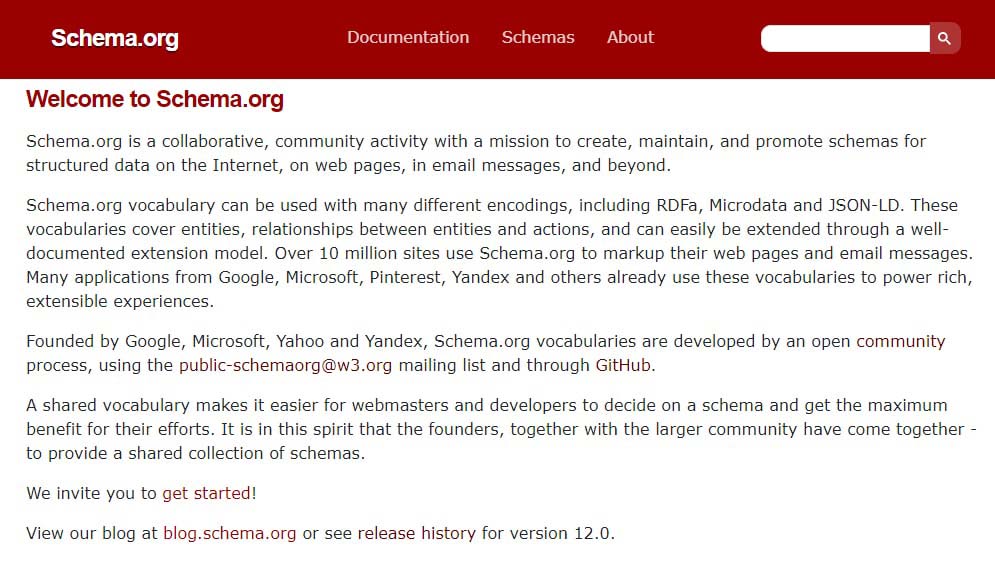
As you can see in the above image, the Schema project was Founded by Google, Microsoft, Yahoo and Yandex. These are the biggest search engines on the planet working together which is rather surprising!
The main reason why these search engines are working together is simple, data needs to be structured in a specific way to allow search engines to interpret the content on a website page. If all the major search engines decided to use different structures then the web developers are business owners would have to work extra hard to mark up content differently for each search engine.
Thank god the “big boys” can play together sometimes 🙂
- Custom web design
- Secure and fast website solution
- Full management training
- Take control of your website
- SEO optimisation
- Reliable web hosting and emails
Why is schema important?
Schema markup (structured data) allows you to tell the search engines more about your business and what type of content can be found on different pages on your website(s).
Here is a list of the most common types of schema markup
| Structure Data Type | Notes | Additional Documentation |
| Local Business | Business details displayed in the Google knowledge panel, including open hours, ratings, directions, and actions to book appointments or order items. | Click Here |
| Article | News, sports, or blog article displayed with Top stories carousel and rich result features, such as headline text and larger-than-thumbnail images. | Click Here |
| Book | Book actions that enable users to buy the book that they find directly from Search results. | Click Here |
| Breadcrumb | Rich results that display in a sequential list or gallery from a single site. This feature must be combined with one of the following features: Recipe, Course, Restaurant, Movie. | Click Here |
| Course | Educational courses that appear in a provider-specific list. Courses can include the course title, provider, and a short description. | Click Here |
| Critic review | A snippet from a longer review article that a single editor has created, curated, or compiled for a publisher. Critic reviews can be about Book, Movie, and Local business. | Click Here |
| Dataset | Large data sets that appear in Google Dataset Search. | Click Here |
| Employer Aggregate Rating | An evaluation of a hiring organization compiled from many users that are displayed in the job search experience on Google. | Click Here |
| Event | An interactive rich result that shows a list of organized events, such as concerts or art festivals, that people may attend at a particular time and place. | Click Here |
| Fact Check | A summarized version of a credible site’s evaluation of a claim made by others. | Click Here |
| FAQ | A Frequently Asked Question (FAQ) page contains a list of questions and answers pertaining to a particular topic. | Click Here |
| Home Activities | An interactive rich result where people can discover online activities that they can do from home. | Click Here |
| How-to | A How-to walks users through a set of steps to successfully complete a task, featuring video, images, and text. | Click Here |
| Image License | In Google Images, the Licensable badge tells people that license information is available for the image, and provides a link to the license in the Image Viewer, which offers more detail on how someone can use the image. | Click Here |
| Job Posting | An interactive rich result that allows job seekers to find a job. The job search experience on Google can feature your logo, reviews, ratings, and job details. | Click Here |
| Job Training (beta) | An interactive rich result that helps job seekers and prospective students find a job training program. | Click Here |
| Logo | Your organization’s logo in search results and Google knowledge panel. | Click Here |
| Math solvers | Help students, teachers, and others with math problems by adding structured data to indicate the type of math problems and step-by-step walkthroughs for specific math problems. | Click Here |
| Movie | The movie carousel helps users explore lists of movies on Google Search (for example, “best movies of 2019”). You can provide details about the movies, such as the title of each movie, director information, and images. | Click Here |
| Estimated salary | Salary estimate information, such as salary ranges and region-based salary averages for job types, displayed in the job search experience on Google. | Click Here |
| Podcast | Enable your podcast to appear in Google Search with a playable link, or in other Google Podcasts platforms such as the Google Podcasts app, Google Assistant, and more. | Click Here |
| Practice problems | Help students, teachers, and parents with education by adding structured data to your practice problems in math and science subjects. | Click Here |
| Product | Information about a product, including price, availability, and review ratings. | Click Here |
| Q&A | Q&A Pages are web pages that contain data in a question and answer format, which is one question followed by its answers. | Click Here |
| Recipe | Recipes that display as an individual rich result or part of a host carousel. | Click Here |
| Review snippet | A short excerpt of a review or a rating from a review website, usually an average of the combined rating scores from reviewers. A review snippet can be about Book, Recipe, Movie, Product, Software App, and Local business. | Click Here |
| Sitelinks Search box | A search box that is scoped to your website when it appears as a search result. | Click Here |
| Software App (beta) | Information about a software app, including rating information, a description of the app, and a link to the app. | Click Here |
| Speakable | Allow search engines and other applications to identify news content to read aloud on Google Assistant-enabled devices using text-to-speech (TTS). | Click Here |
| Subscription and paywalled content | Indicate paywalled content on your site to help Google differentiate paywalled content from the practice of cloaking, which violates our guidelines. | Click Here |
| Video | Video information in search results, with the option to play the video, specify video segments, and live-stream content. | Click Here |
The above are some of the most common markup types, but there are hundreds of more structured data types.
You can use Schema.org to search for specific structured data types (schema types).
- The schemas are a set of ‘types’, each associated with a set of properties. The types are arranged in a hierarchy.
- The vocabulary currently consists of 779 Types, 1390 Properties 15 Datatypes, 81 Enumerations and 437 Enumeration members.
Schema.org also gives you the ability to browse the full hierarchy list of types.
It should be noted that using schema markup could potentially improve your website’s search engine rankings.
How to use schema markup on your website
For basic schema markup, you can use the Google Structured Data Markup Helper Tool.
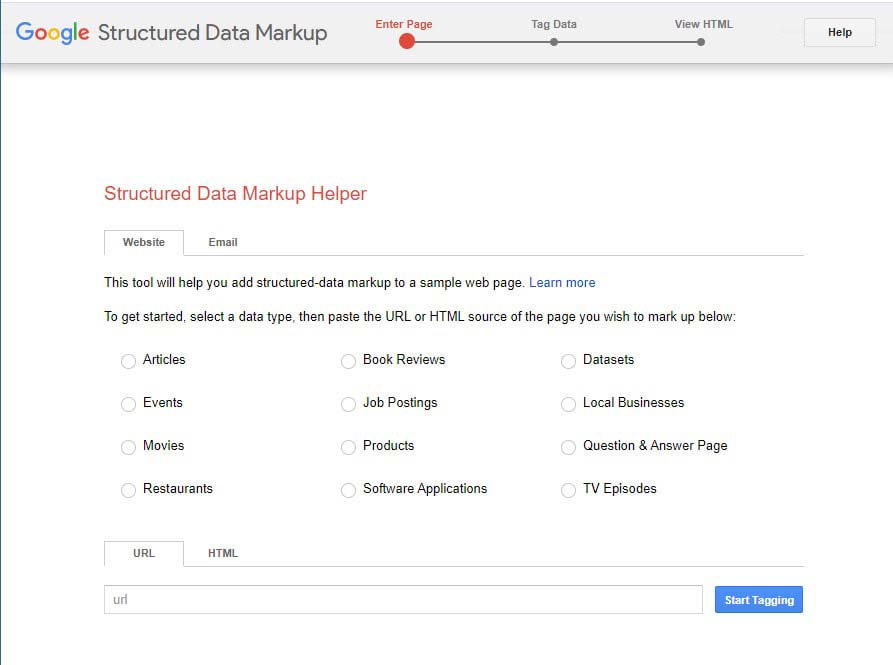
2. Select a data type
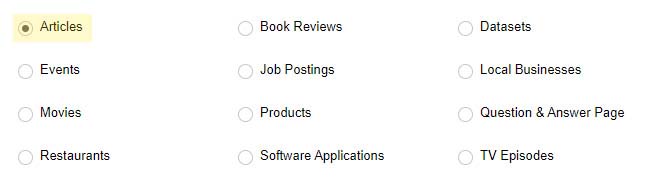
On the Google Structured Data Markup Helper website, there are options to markup different types of content as follows:
- Articles
- Book Reviews
- Datasets
- Events
- Job Postings
- Local Businesses
- Movies
- Products
- Questions & Answers Page
- Restaurants
- Software Applications
- TV Episodes
In this tutorial, I will select Articles.
3. Paste in the website page URL you want to markup
In this tutorial, I will paste in the following URL: https://dcpweb.co.uk/blog/30-essential-tips-for-improving-your-web-design
- Select the “blue” Start Tagging button

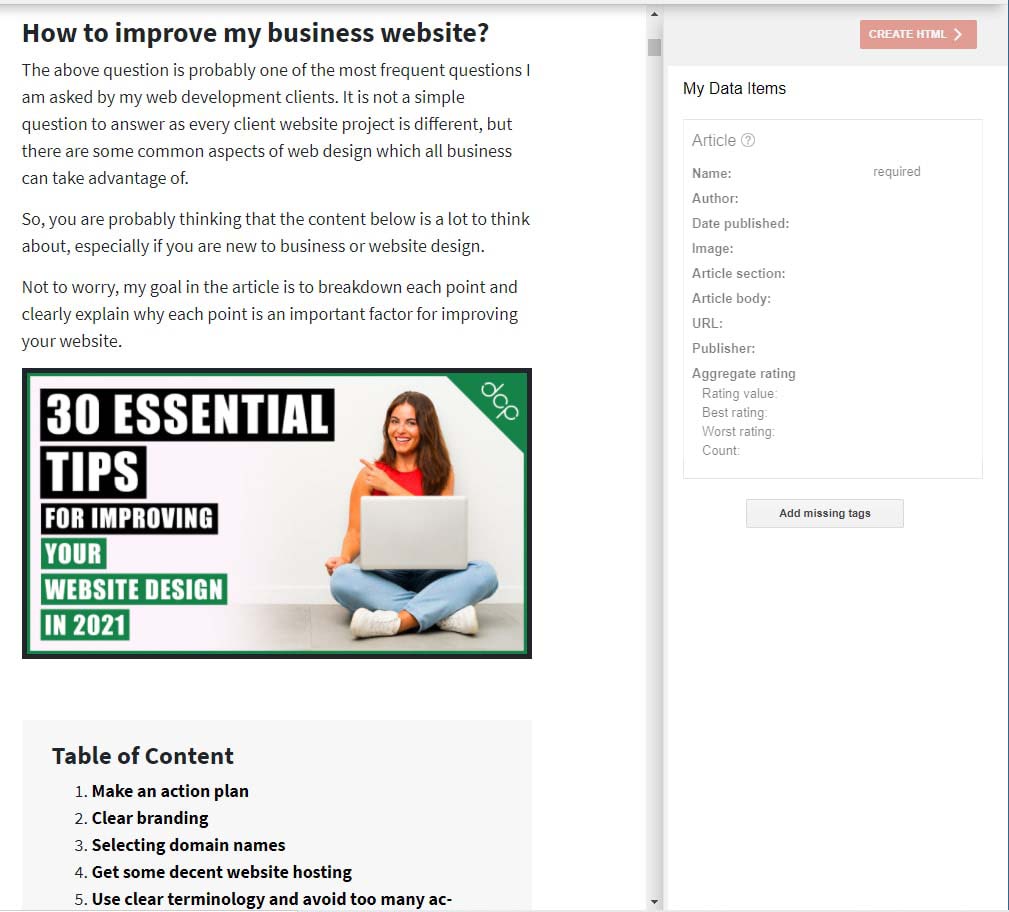
4. A new page will load the Google structured markup tool
- You’ll see your web page on the left side, and the markup data items on the right side.
5. Select content on your page to add to mark up fields
On the right-side panel you will see the following fields:
| Field Name | General Notes |
| Name | Title of the article or blog post |
| Author | Name of the article or blog post author |
| Date Published | Date article or blog post published |
| Image | Image thumbnail for article or blog post |
| Article Section | Category of the article or blog post |
| Article Body | This field can contain the whole article/blog post or a specific section |
| URL | Website link to the article |
| Publisher | Company name |
| Aggregate rating | Rating value | Average rating value from 1 to 5 |
| Aggregate rating | Best rating | Best rating value from 1 to 5 |
| Aggregate rating | Worst rating | Worst rating value from 1 to 5 |
| Aggregate rating | Count | The total amount of ratings |
To simplify the process, I will use only the fields highlighted in blue in the above table.
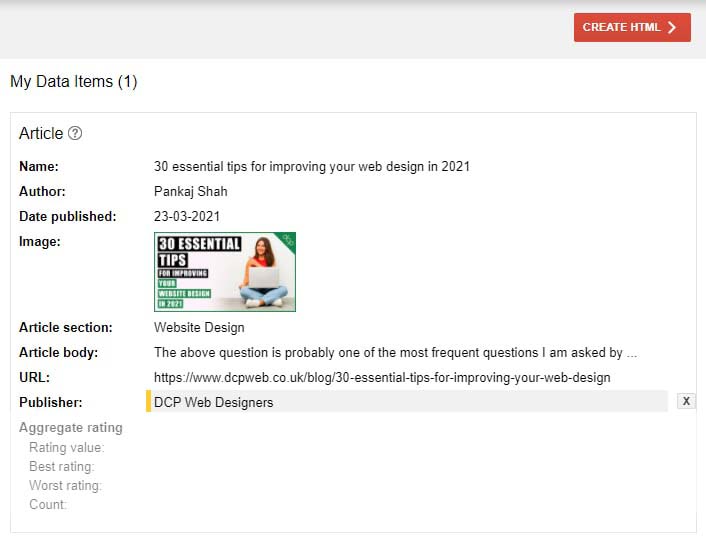
5.1. Populate the "name" tag field
- To populate the name field simply select the article or blog post title with your mouse as shown below, once the text is selected a pop-up will display and then select the “name” field.
5.2. Populate the "Author" tag field
- To populate the “author” field I will need to scroll to the bottom of the page and select my name as shown below.
5.3. Populate the "Date Published tag field
- To populate the date published field simply select the article or blog post date with your mouse as shown below, once the text is selected a pop-up will display and then select the “date published” field.
5.4. Populate the "Image" tag field
- I have a thumbnail on the blog post and I will use this image to populate the “image” field as shown below.
5.5. Populate the "Article Section" tag field
- The “article section” field should be populated with the category for this blog post, I will need to populate the field manually as shown below. I will update my website to display the article category to make this step easier in the future as I will be able to select the text rather than manually entering information.
5.6. Populate the "Article Body" tag field
- The “article body” field can be the full article or a section of the article, I will select the intro section of the blog post as shown below.
5.7. Populate the "URL" tag field
- For the “URL” field I will simply paste in the website address for the blog post manually as shown below.
5.8. Populate the "Publisher" tag field
- For the “Publisher” field I will select my company’s name at the bottom of the article.
6. Create HTML
Select the red “Create HTML” button located in the top right corner.
7. Structured data as JSON-LD markup
- Google will generate the structured data in JSON-LD format.
- Select all the text and paste it into notepad or another text editor.
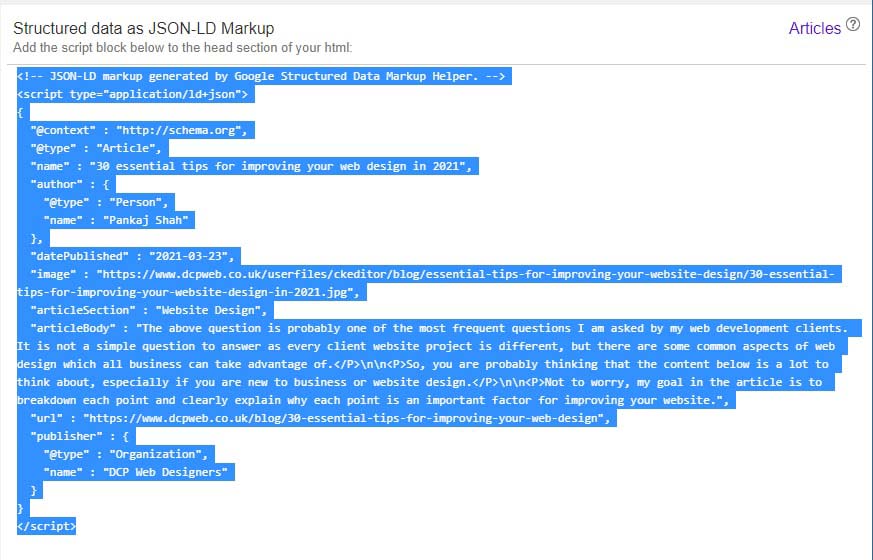
Below is a copy of the code Google structured data markup tool generated for my blog post.
					<!-- JSON-LD markup generated by Google Structured Data Markup Helper. -->
<script type="application/ld+json">
{
  "@context" : "http://schema.org",
  "@type" : "Article",
  "name" : "30 essential tips for improving your web design in 2021",
  "author" : {
    "@type" : "Person",
    "name" : "Pankaj Shah"
  },
  "datePublished" : "2021-03-23",
  "image" : "https://cdn.dcpweb.co.uk/userfiles/ckeditor/blog/essential-tips-for-improving-your-website-design/30-essential-tips-for-improving-your-website-design-in-2021.jpg",
  "articleSection" : "Website Design",
  "articleBody" : "The above question is probably one of the most frequent questions I am asked by my web development clients. It is not a simple question to answer as every client website project is different, but there are some common aspects of web design which all business can take advantage of.</P>\n\n<P>So, you are probably thinking that the content below is a lot to think about, especially if you are new to business or website design.</P>\n\n<P>Not to worry, my goal in the article is to breakdown each point and clearly explain why each point is an important factor for improving your website.",
  "url" : "https://dcpweb.co.uk/blog/30-essential-tips-for-improving-your-web-design",
  "publisher" : {
    "@type" : "Organization",
    "name" : "DCP Web Designers"
  }
}
</script>
8. Testing Structured data as JSON-LD Markup
- Before adding any code to your web pages, it is advisable to test the code.
- We can test the structured data markup manually by using the Google Rich Results Testing Tool: https://search.google.com/test/rich-results
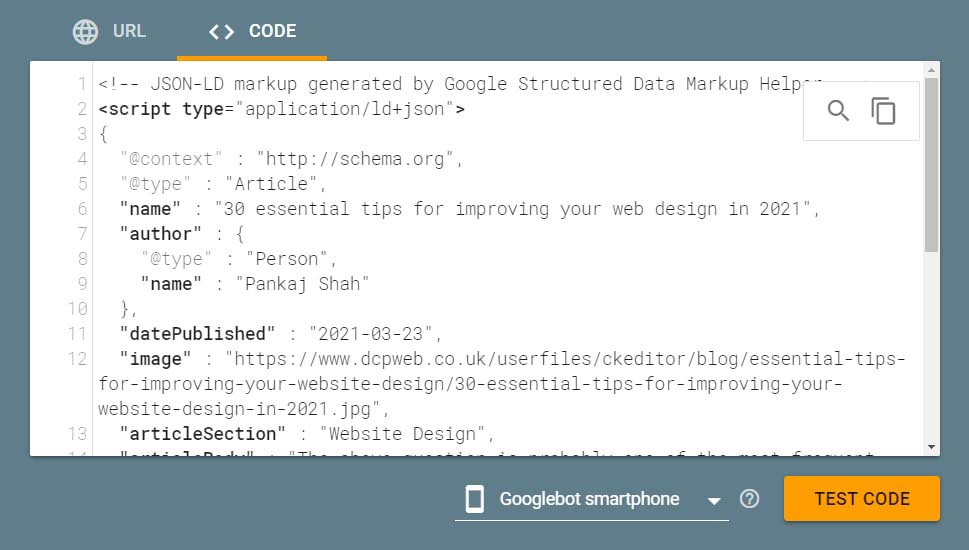
Note: At present, we do not have the code added to our web page so we need to select the “<> Code” option as shown below.
- Select the “<> code” option and paste in the code which you generated using the Google Structured Data MarkupTool.
- Select the orange “Test Code” button.
9. Testing structured data results
- In the image below we can see the code has validated successfully.
Page is eligible for rich results!
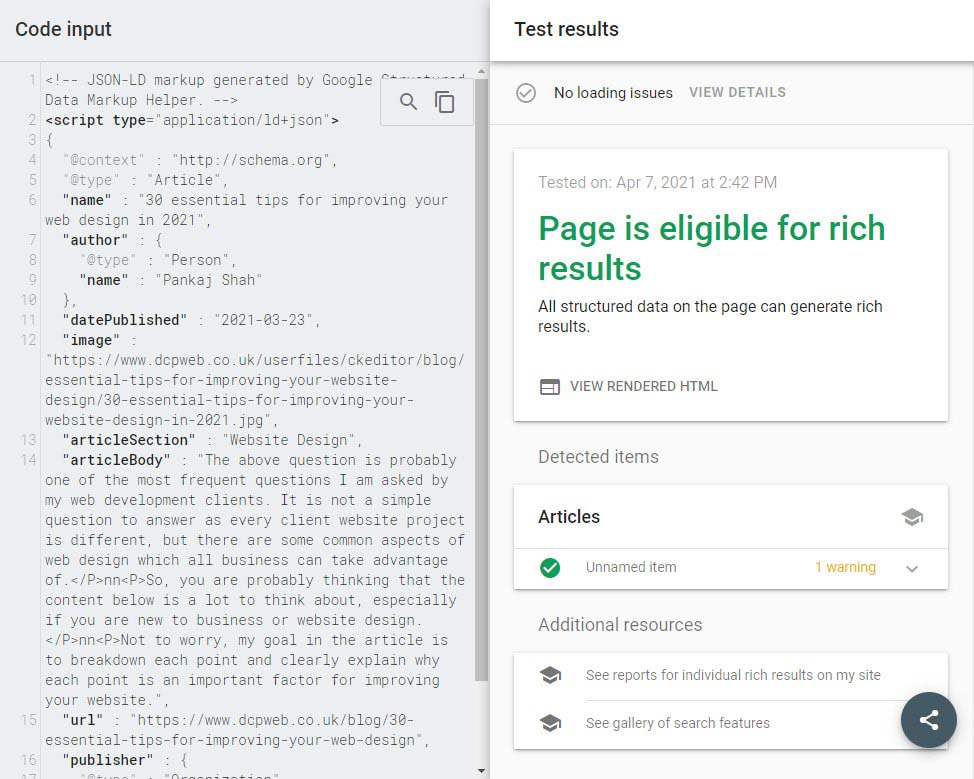
Note: You can see 1 warning as there is a missing field “heading”, but this field is optional.
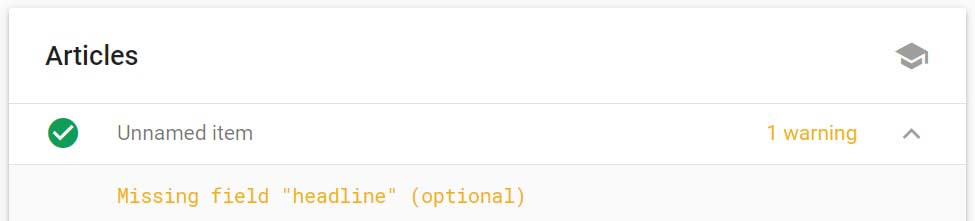
We can fix this warning by simply adding the missing field into our markup code.
- The additional “Headline” field is code is highlighted in BROWN below.
					<!-- JSON-LD markup generated by Google Structured Data Markup Helper. -->
<script type="application/ld+json">
{
  "@context" : "http://schema.org",
  "@type" : "Article",
  "name" : "30 essential tips for improving your web design in 2021",
  "headline" : "30 essential tips for improving your web design in 2021",
  "author" : {
    "@type" : "Person",
    "name" : "Pankaj Shah"
  },
  "datePublished" : "2021-03-23",
  "image" : "https://cdn.dcpweb.co.uk/userfiles/ckeditor/blog/essential-tips-for-improving-your-website-design/30-essential-tips-for-improving-your-website-design-in-2021.jpg",
  "articleSection" : "Website Design",
  "articleBody" : "The above question is probably one of the most frequent questions I am asked by my web development clients. It is not a simple question to answer as every client website project is different, but there are some common aspects of web design which all business can take advantage of.</P>nn<P>So, you are probably thinking that the content below is a lot to think about, especially if you are new to business or website design.</P>nn<P>Not to worry, my goal in the article is to breakdown each point and clearly explain why each point is an important factor for improving your website.",
  "url" : "https://dcpweb.co.uk/blog/30-essential-tips-for-improving-your-web-design",
  "publisher" : {
    "@type" : "Organization",
    "name" : "DCP Web Designers"
  }
}
</script>
We can now re-test our new markup code as shown above by following step 8 above.
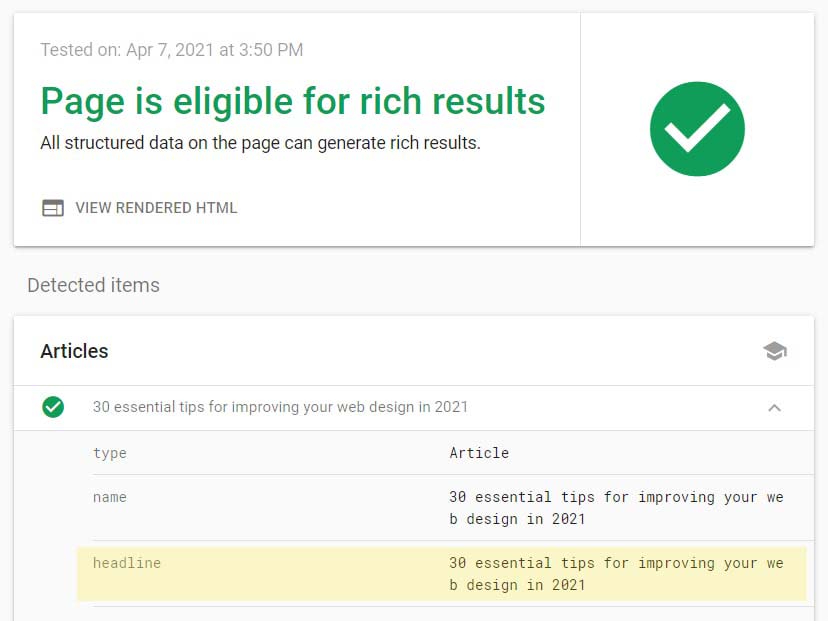
- Below we can see the new tag for the “headline” field highlighted in yellow.
- The warning has also been removed.
10. Improving structured data with additional tags
We can improve the structure data by manually adding the following additional tags for the publisher’s website URL and the publisher logo.
- Below I have added some additional structure data which is highlighted in BROWN color.
					<!-- JSON-LD markup generated by Google Structured Data Markup Helper. -->
<script type="application/ld+json">
{
  "@context" : "http://schema.org",
  "@type" : "Article",
  "name" : "30 essential tips for improving your web design in 2021",
  "headline" : "30 essential tips for improving your web design in 2021",
  "author" : {
    "@type" : "Person",
    "name" : "Pankaj Shah"
  },
  "datePublished" : "2021-03-23",
  "image" : "https://cdn.dcpweb.co.uk/userfiles/ckeditor/blog/essential-tips-for-improving-your-website-design/30-essential-tips-for-improving-your-website-design-in-2021.jpg",
  "articleSection" : "Website Design",
  "articleBody" : "The above question is probably one of the most frequent questions I am asked by my web development clients. It is not a simple question to answer as every client website project is different, but there are some common aspects of web design which all business can take advantage of.</P>nn<P>So, you are probably thinking that the content below is a lot to think about, especially if you are new to business or website design.</P>nn<P>Not to worry, my goal in the article is to breakdown each point and clearly explain why each point is an important factor for improving your website.",
  "url" : "https://dcpweb.co.uk/blog/30-essential-tips-for-improving-your-web-design",
  "publisher" : {
    "@type" : "Organization",
    "name" : "DCP Web Designers",
    "url": "https://dcpweb.co.uk/",
    "logo": {
          "@type": "ImageObject",
          "url": "https://cdn.dcpweb.co.uk/userfiles/ckeditor/dcp-web-designers-logo/dcp-logo-01.jpg"
        }
  }
}
</script>
In the updated code above we have added additional tags for my main website URL and my company logo under the publisher tags section.
- You view a full list of available article markup tags here: https://schema.org/Article
13. Fixing errors and warnings
If the Google Rich Results Testing Tool reports errors then these should be fixed before adding structured data to your website page.
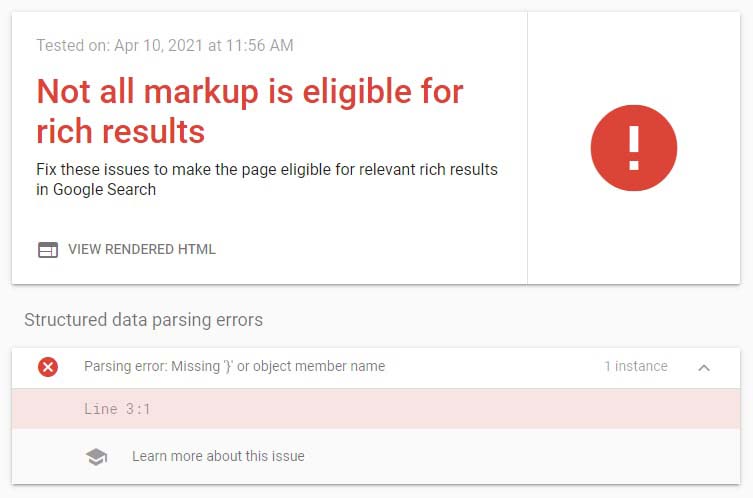
- Simply review your markup code and fix the error.
Note: I would suggest you create a basic JSON-LD markup first, then test the code to see if it validates correctly first. You can then save this code as your master file.
Next, you can start to add additional markup tags and validate. If the code validates OK then you can save this as a new file.
Continue to add more structured data tags, if you receive an error after testing then you can compare the previous valid saved file with the new markup code which is showing errors.
This will help you to find where the errors are and fix them.
12. Adding structured data to your website
The method used for adding structured data to your website is dependent on the CMS (Content Management System) you are using.
For WordPress websites, I would recommend using one of the following plugins:
The above plugins are probably the simplest method of adding structured data to your website pages. Most of the WordPress plugins will automate a lot of the markup but provide limited coverage of the available schema data structures.
I would suggest it is better to have a good understanding of creating your own schema markup and adding the code directly into your WordPress pages for optimum markup.
Note: You can place the schema structured data markup in JSON-LD format into the <HEAD> or <BODY> of your HTML.
If you have a custom build CMS system, then you can use the Google Tag Manager to inject JSON-LD markup into your pages. Google also recommends using GTM as one of the official options for adding schema markup.
Here are some useful blog posts for using Google Tag Manager for structured data implementation:
- https://searchengineland.com/add-schema-markup-site-using-google-tag-manager-272516
- https://www.semrush.com/blog/how-to-add-faq-schema-google-tag-manager/
- https://moz.com/blog/using-google-tag-manager-to-dynamically-generate-schema-org-json-ld-tags
Some Shopify themes also support schema markup or you can use a few available apps like JSON-LD for SEO or SEO Manager.
For Squarespace check out this useful article: https://www.briancurb.com/how-to-add-schema-to-squarespace-websites/
Wix you will need to paste in your code under the SEO (Google) option: https://support.wix.com/en/article/adding-structured-data-to-your-site
For WooCommerce website design solutions you can use the Yoast WooCommerce SEO plugin
For my blog, I will simply paste the code into the body of the blog post.
It should be noted that if you have access to a good web designer then it should be possible to automate the adding of structured data to your website pages, after all the markup is just a case of filling in different variables with existing data or using static variables where required.
13. Monitoring your structured data
Google search console does provide some monitoring of structured data. You will need to sign up for the Google search console here: https://search.google.com/search-console/about
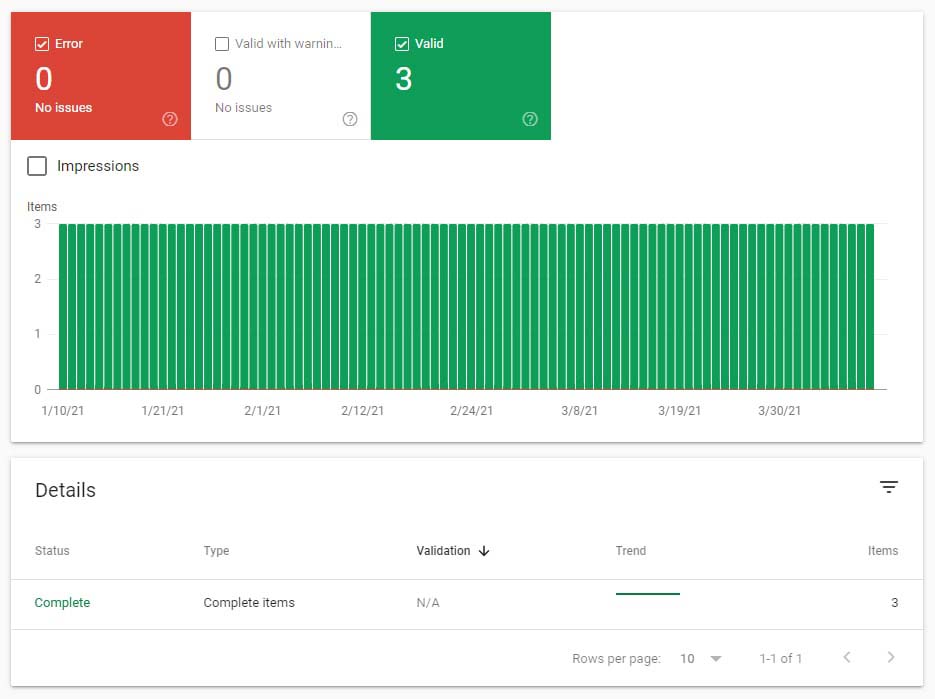
Once you have verified your website you will be able to see structured data markup validation as shown below.
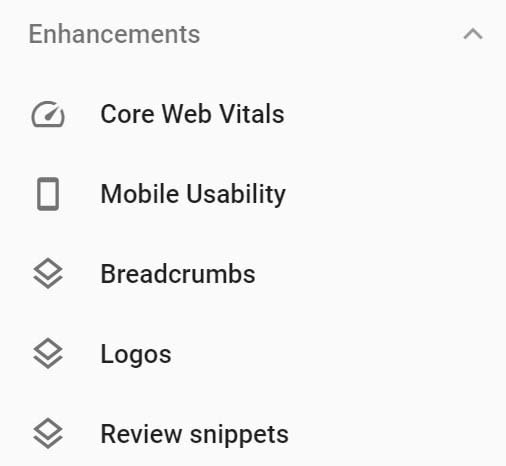
If I select the “Reviews Snippets” in the menu I will see the results returned.
- Custom web design
- Secure and fast website solution
- Full management training
- Take control of your website
- SEO optimisation
- Reliable web hosting and emails
14. Useful schema markup resources
Article created by: Pankaj Shah | DCP Web Designers

