

In today’s competitive digital landscape, having a website is no longer enough. To stand out, your WordPress site must be optimised for search engines like Google.
SEO (Search Engine Optimisation) is the practice of improving your site’s visibility to increase organic traffic, and WordPress is an excellent platform for implementing SEO strategies.

Here are 10 essential WordPress SEO tips to help your website climb the search engine rankings in 2025.
1. Choose an SEO-Friendly WordPress Theme

Your WordPress theme forms the foundation of your website. An SEO-friendly theme ensures your site loads quickly, has a clean codebase, and is mobile-responsive—all crucial ranking factors.
- Key Features to Look For: Lightweight design, fast loading speed, schema markup support, and responsiveness.
- Recommended Themes: Astra, GeneratePress, and OceanWP are popular choices optimised for SEO.
Pro Tip: Use Google’s Mobile-Friendly Test tool to ensure your theme is responsive across devices.
2. Optimise Your Permalinks
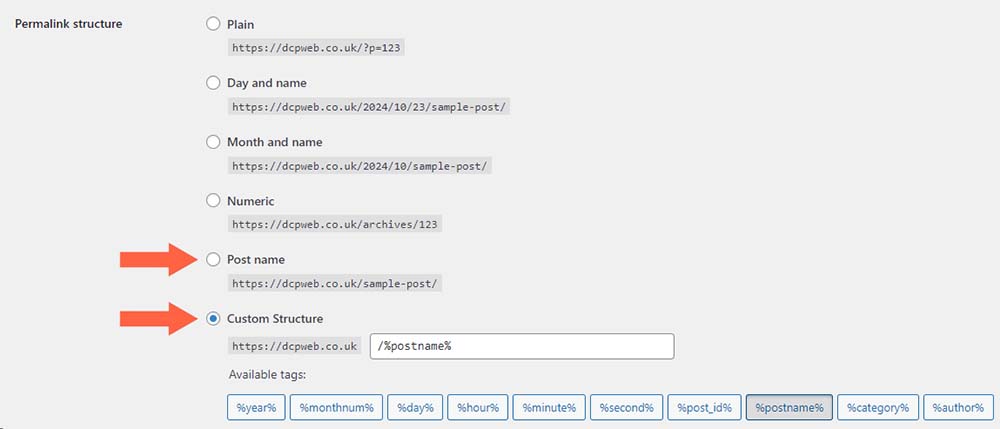
Permalinks are the URLs for your blog posts and pages. WordPress provides default URL structures, but not all of them are SEO-friendly.
- Go to Settings > Permalinks in your WordPress dashboard.
- Choose the “Post Name” structure to make URLs short, descriptive, and keyword-rich.
Example:
Instead of yoursite.com/?p=123, use yoursite.com/essential-wordpress-seo-tips.
3. Use an SEO Plugin

SEO plugins make it easier to optimise your content and website settings without requiring advanced technical skills.
Recommended Plugins:
These plugins guide you in optimising your content for focus keywords, improving readability, and setting up meta descriptions and titles.
4. Conduct Keyword Research
Keywords are the backbone of SEO. Identify the terms your audience is searching for and use them strategically in your content.
Tools for Keyword Research:
Focus on long-tail keywords that reflect user intent. For example, instead of targeting “WordPress plugins,” aim for “best WordPress SEO plugins for small businesses.”
Pro Tip: Incorporate keywords naturally into your content to avoid keyword stuffing, which can harm your rankings.
5. Optimise Titles and Meta Descriptions

Your title tag and meta description are the first things users see in search results. They play a significant role in improving click-through rates (CTR).
Best Practices:
- Include your primary keyword in the title.
- Keep titles under 60 characters and meta descriptions under 160 characters.
- Write compelling, action-driven descriptions.
Example:
- Title: “10 Essential WordPress SEO Tips to Boost Your Rankings in 2025”
- Meta Description: “Learn 10 proven WordPress SEO strategies to improve your Google rankings in 2025. Optimise your site and drive organic traffic!”
6. Optimise Images for SEO

Large, unoptimised images can slow down your website, negatively impacting your SEO. Optimising images improves loading times and enhances user experience.
7. Create High-Quality, Engaging Content

Content remains king in SEO. Google prioritises websites that provide value to users, so focus on creating in-depth, engaging, and original content.
Tips for Better Content:
- Solve specific problems your audience faces.
- Use a mix of text, images, and videos.
- Structure content with headings (H1, H2, H3) for better readability.
- To ensure your content is truly original and engaging, consider using an AI detector to check for authenticity.
Pro Tip: Aim for long-form content (1,000+ words) when tackling complex topics, as it often performs better in search rankings.
8. Improve Your Site’s Speed

Page speed is a critical ranking factor. Slow-loading websites lead to higher bounce rates, which can hurt your SEO.
How to Improve Speed:
- Use a caching plugin like WP Rocket or NitroPack.
- Optimise CSS, JavaScript, and HTML using tools like Autoptimize.
- Enable browser caching and leverage a Content Delivery Network (CDN) like Cloudflare.
Pro Tip: Test your site’s speed using Google PageSpeed Insights or GTmetrix and follow their recommendations.
9. Build a Strong Internal Linking Structure

Internal links connect your content, making it easier for users to navigate your site and for search engines to crawl it.
Benefits of Internal Linking:
- Improves page authority.
- Enhances user experience by guiding readers to related content.
- Helps search engines understand your site’s structure.
Example: If you have a blog post about “WordPress Plugins,” link it to related posts like “Best SEO Plugins for WordPress” or “How to Install a WordPress Plugin.”
Pro Tip: Use descriptive anchor text with relevant keywords.
10. Regularly Update and Maintain Your Website

A well-maintained WordPress website signals to Google that your content is up-to-date and relevant.
What to Update:
- Refresh old blog posts with new information and statistics.
- Fix broken links using tools like Broken Link Checker.
- Ensure all plugins, themes, and WordPress core files are updated.
Pro Tip: Set a reminder to audit your website every few months to identify areas for improvement.
Bonus Tip: Leverage Schema Markup

Schema markup helps search engines understand your content better and enhances the way your site appears in search results.
- Use tools like Schema Pro or Rank Math to add structured data.
- Popular schema types: FAQs, recipes, and reviews.
Pro Tip: Test your schema using Rich Results Test tool.
Conclusion
Implementing these 10 WordPress SEO tips can significantly improve your site’s visibility on Google in 2025. From choosing an SEO-friendly theme to optimising your content and improving site speed, every small step counts toward better rankings.
Remember, SEO is an ongoing process. Stay updated on the latest algorithm changes and continue refining your strategies for long-term success. With consistent effort and these actionable tips, your WordPress site will be well-positioned to dominate the search engine results pages (SERPs).
Start optimising today and watch your organic traffic soar!

