

In this video tutorial, I will show you how to change the WP Admin URL For WordPress.
How to change WordPress admin URL video tutorial
Changing the URL for WordPress admin access can improve website security.
WordPress plugin used in this tutorial: WPS Hide Login
Watch my free video tutorial for changing the WordPress admin URL.
Video Tutorial Content
- Introduction for changing a WordPress admin URL
- Login into the WordPress admin control panel and Install the WP Hide Login plugin
- Edit WP Hide Login settings
- Enter a new slug for the WordPress admin login URL
- Test new admin URL
Hide WP Admin URL Step-by-Step Guide
Step 1 - Login into your WordPress Admin Control Panel and then select the "Plugins" tab.
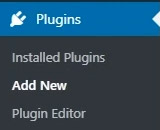
Step 2 - Type "WPS Hide Login" into the Plugin search bar

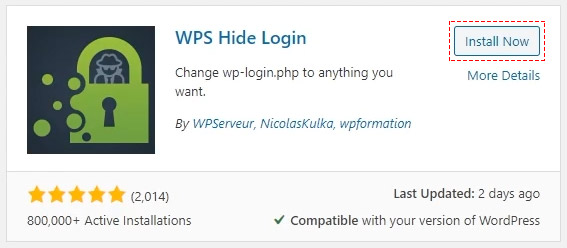
Step 3 - Select the "Install Now" button for "WPS Hide Login"
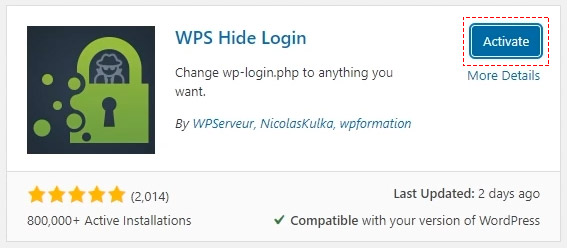
Step 4 - Select the "Activate" button for "WPS Hide Login"
Step 5 - Select the "Settings" menu and then select the "WPS Hide Login" settings
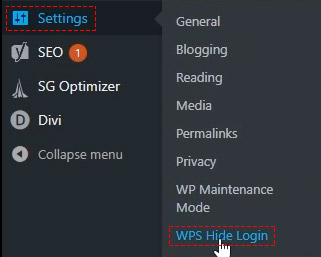
Step 6 - Enter a new WordPress admin URL

Step 7 - Select the "Save Changes" button

Step 8 - Test The custom admin URL
- Open up different web browsers where you are not logged into the WordPress admin.
- Type in your custom admin URL into the address bar to check it is working correctly before you log out of WordPress admin.
Important WordPress Notes:
- Make sure you keep a copy of the custom URL for future reference.
- Email your clients or staff if you have changed the admin URL.
- Select a custom URL that is hard to guess.
Video tutorial for WP Hide Login plugin
Hide WordPress Admin Login FAQs
Why should I change the default WordPress admin URL?
For security, it is better to have a custom URL for your WordPress admin control panel.
Changing the default WordPress admin URL can help prevent automated bot attacks and brute force attacks which are often used to try and gain access to the WordPress admin control panel.
How often should I change the WordPress admin URL?
I would recommend changing the admin URL for WordPress every 6 months. Keeping those bots and hackers guessing will only help to improve the security of your WordPress website.
You should make the admin URL difficult to guess which also improves security.
Remember to use a strong password for the WordPress admin account and change the password if you give it to a web designer after they have completed an update or upgrade.
What WordPress theme has the best security?
When building standard WordPress website design solutions I often use Divi Themes as the theme developer keeps the software up to date with new security patches. Try to avoid free WordPress themes if possible as these tend to be less well maintained.
- Custom web design
- Secure and fast website solution
- Full management training
- Take control of your website
- SEO optimisation
- Reliable web hosting and emails
WordPress video tutorial by: DCP Web Designers in London

